Xbox gamertag rules: 12 characters, spaces and the # suffix
Updated October 12, 2026 · 8 sections
Shadow Runner is too long for a new Xbox gamertag; ShadowRunner fits exactly. Xbox gamertag rules allow up to 12 characters in the modern name, and a numeric suffix can distinguish players with the same name.
Count spaces as well as letters, and look at the suffix on the confirmation screen before changing your name. I would keep two shorter alternatives ready. The examples below show how the modern limit differs from the older 15-character format.
Modern 12 versus classic 15
Two numbers float around the web, and both are real. Microsoft's developer documentation lists a modern gamertag as up to 12 characters, and a classic gamertag as up to 15. Classic gamertags are the older ones, written in a narrow set: ASCII letters, digits, a comma and a space. That is where the stubborn "15 characters" answer comes from, and plenty of name lists still repeat it.
If you are creating a new gamertag today, plan for 12. A 13-character idea such as Shadow Runner is simply too long; ShadowRunner is 12 and Shadow Run is 10. You can read the figures yourself in the XUserGamertagComponent reference and the gamertags overview.
| Type | Max length | Character set |
|---|---|---|
| Classic | 15 | ASCII letters, digits, comma, space |
| Modern | 12 | Supports additional writing systems; this generator uses ASCII letters, digits and spaces |
Which characters to stay with
I keep every Xbox name to letters, digits and single spaces, and I never start with a digit. That is the safe rule the generator on this site applies to Xbox results. It is a deliberately cautious choice of ours, not a quote from Microsoft, and the reason is practical: a name made of plain letters and one space travels well. Friends can type it into a search box, it survives being read out in party chat, and no system downstream has to guess what a symbol means.
- Underscores and hyphens: common on other platforms, so they tempt people. For Xbox, skip them.
Shadow_Runneris also 13 characters, so it fails twice. - A space: fine, and it helps readability.
Shadow Foxreads as two clean words. Use one space, not a trailing one. - Digits: fine inside or at the end, but not as the first character.
7Reaperis the kind of name I would not submit;Reaper7says the same thing. - Capitals: use them to mark word boundaries.
NightOwlis easier to read thannightowland costs nothing.
What the # and the numbers mean
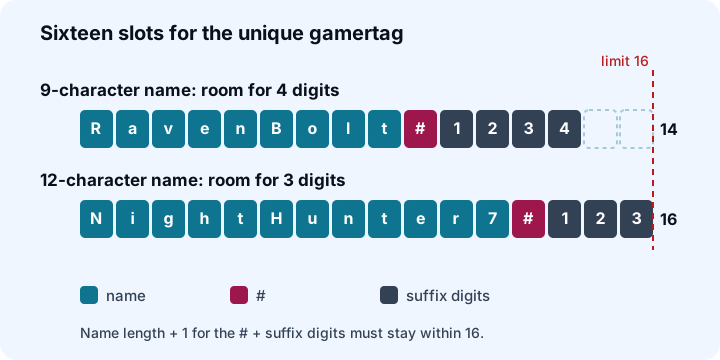
Gamertags are no longer unique on their own. If the name you want is already taken, Xbox keeps it and attaches a # followed by digits, so two players can both be RavenBolt and still be told apart. The full unique form, name plus # plus digits, is capped at 16 characters. That cap decides how many digits you get, and it is the one rule I wish every beginner knew.
Run that for a short name and a long one:
RavenBoltis 9 characters. 9 + 1 + 4 = 14, so it can carry a 4-digit suffix:RavenBolt#1234.NightHunter7is 12 characters. 12 + 1 + 3 = 16, which leaves room for only 3 digits:NightHunter7#123.
| Name length | Typical suffix | Example | Unique length |
|---|---|---|---|
| 6 | 4 digits | RavenX#1234 | 11 |
| 9 | 4 digits | RavenBolt#1234 | 14 |
| 11 | 4 digits | RavenStrike#1234 | 16 |
| 12 | 3 digits | NightHunter7#123 | 16 |
Names of 11 characters or fewer normally get four digits; a 12-character name gets three. I prefer leaving a character or two spare in a shortlist. Not because it matters to the system, but because a four-digit suffix looks less cramped than a three-digit one on a name that already fills the line.
The suffix does not mean your name is worse. It means the plain version was taken. Some players like to be the only one without a number; if that is you, pick something less obvious than a single common word, and read the section on testing below.
Check the change screen before committing
Xbox creates a gamertag when you first sign in. Eligibility for a free change and any later charge should be checked on your own confirmation screen. I will not quote a price because it differs by region and shifts over time; check the current amount on the change screen, which is described on Microsoft's gamertag support page.
The practical lesson is to treat a confirmed change as a deliberate choice. Do not burn it on a name you picked in thirty seconds. If you are still working through ideas, a style-by-style list is in cool gamertag ideas, and if the same name is meant for a battle royale account too, compare it against the Fortnite name rules before you commit to either.
A five-step routine before you confirm
- Count characters. Spaces count. 12 is the ceiling; 11 or fewer leaves a four-digit suffix if someone beat you to it.
- Strip anything outside letters, digits and one space. No underscores, no accents, no emoji.
- Say it aloud twice. If you stumble, your teammates will too.
- Type it into the change screen and read the answer. The screen checks the name before you confirm anything, and I trust that over any third-party list. This generator does not look up availability.
- Keep two backups. Write down a second and third choice before you press confirm, so a rejection does not send you into a panic pick.
Party chat and look-alike characters
A gamertag is something you spell out loud. On a loud night, in a party of five, "add me, it's capital I, lowercase L, then a one" is how friend requests die. The characters to avoid are the look-alikes:
| Pair | Problem | Safer choice |
|---|---|---|
| l / I / 1 | Lowercase L, capital i and one can look identical | Use words that avoid them, or add a distinct letter |
| O / 0 | Letter and zero look alike | Skip zero; spell numbers sparingly |
| rn / m | Two letters read as one | Choose a different word |
| vv / w | Same trick | Use a plain w |
The same goes for leet substitutions. N1ghtH0wl looks clever and is easy to mistype. Anything with more than a trailing digit or two starts to look like an auto-generated account, which is not the impression you want in a ranked lobby. Keep to whole words, one or two of them, with a short number at most.
Keep personal details out
A gamertag is public. Leave out your real name, your birth year, your school and your town. This matters most for younger players, and it should be the first check when choosing a name for a child. Pick two ordinary words you like, join them, and stop.
Where to go next
- Need a quick shortlist that fits 12 characters? Use the gamertag generator with the Xbox setting.
- Want themes and style notes? Read cool gamertag ideas.
- Playing on more than one platform? The limits differ, and the Fortnite guide covers the 3 to 16 range Epic allows.
FAQ
How many characters can an Xbox gamertag be?
A modern gamertag is up to 12 characters. Classic gamertags allowed up to 15, which is why older lists still quote that number.
What does the # and the number after my gamertag mean?
It is a suffix added when someone else already owns the name. The full unique form, name plus # plus digits, is capped at 16 characters.
Why does a 12-character gamertag only get 3 digits?
The unique form is limited to 16 characters. A 12-character name plus the # leaves room for just 3 digits, while names of 11 or fewer normally get 4.
Can an Xbox gamertag have spaces or underscores?
A single space is fine and the generator on this site uses it. I skip underscores for Xbox; plain letters, digits and one space are the safest set.
How many times can I change my gamertag for free?
Microsoft's support page gives one free change after the auto-created gamertag. Later changes are paid, so check the current price on the change screen.